Strix Halo
Strix Halo is the reference platform for hal0. It’s the box the core team develops against, the box the CI smoke tests target, and the box every performance number on this site was measured on. If you’re deciding whether a Ryzen AI Max-class APU is the right homelab AI machine, this page is the deepest answer hal0 has to give.
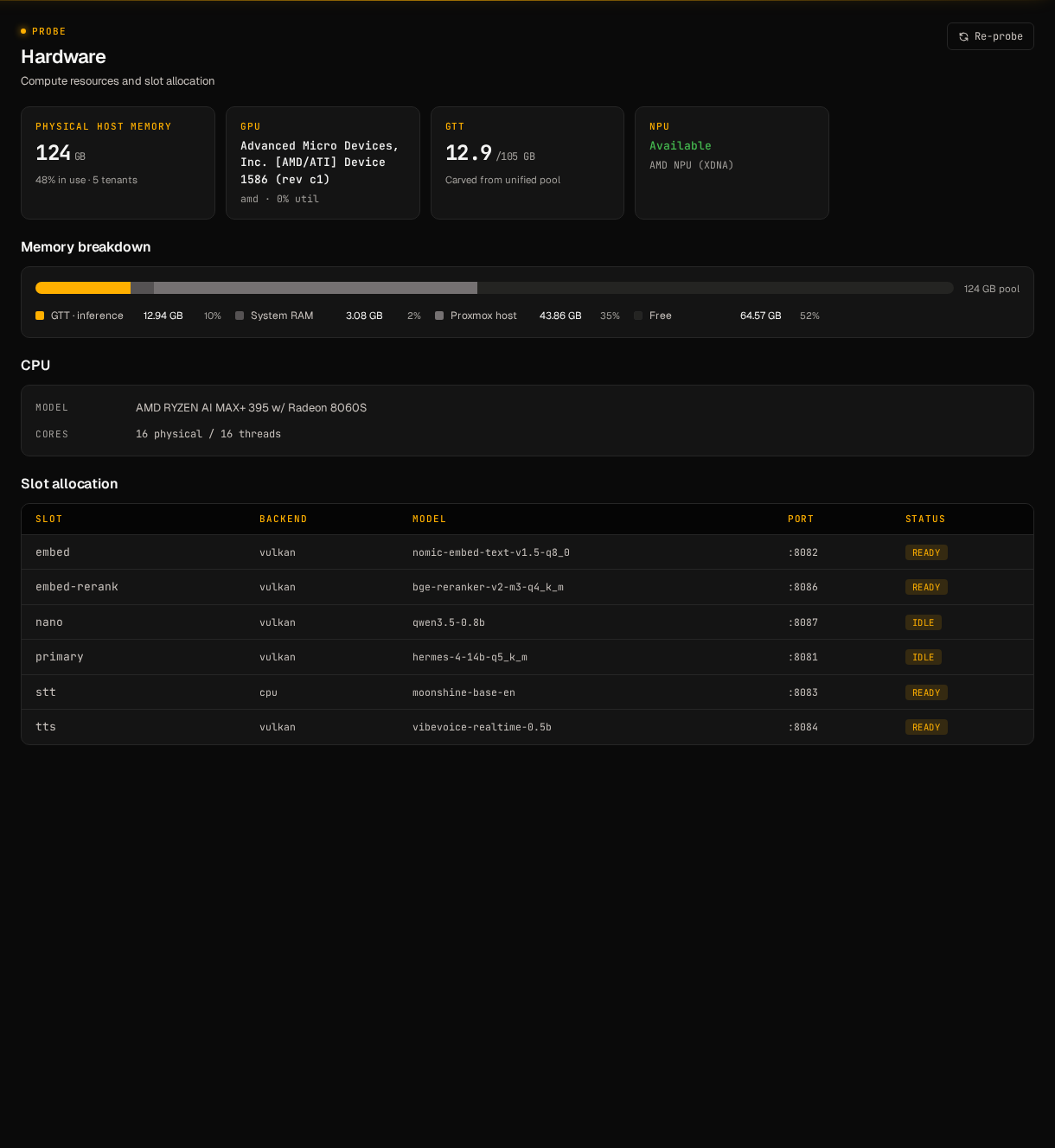
The /hardware page in the dashboard renders what hal0 probe wrote
to /etc/hal0/hardware.json: iGPU, NPU, the unified pool, and the
toolboxes the installer wired in.
The chip
Section titled “The chip”AMD Strix Halo is the codename for AMD’s Ryzen AI Max family, high-end mobile/SFF APUs that combine a Zen 5 CPU, a large RDNA 3.5 integrated GPU branded Radeon 8060S, an XDNA-2 NPU, and a wide LPDDR5X memory controller on a single package. The headline target SKU is the Ryzen AI Max+ 395, paired with 128 GB of LPDDR5X-8000 unified system memory. Lower-tier 385 and 390 parts ship in 64 GB configurations and stay first-class for hal0. Most loadouts on this page work on a 64 GB box with tighter context budgets.
What makes Strix Halo interesting for inference isn’t any single component. It’s the combination:
- One pool of memory. The CPU, the iGPU, and the NPU all address the same LPDDR5X. There is no PCIe transfer for weights, no host-to-device copy, no “is this tensor on the right device” cliff. When the iGPU loads a 42 GB Q4 70B, it’s reading from the same bytes the CPU sees.
- The iGPU is real. Radeon 8060S is roughly RX 7600 class on RDNA 3.5. There’s enough compute to push a 7B Q4 model into hundreds of tokens per second, and enough memory bandwidth (LPDDR5X-8000 in a 256-bit configuration) to keep it fed.
- The NPU is useful. The XDNA-2 block targets low-precision matmul at low idle power. It isn’t a primary chat engine. It’s good for always-on small models, wake-word detection, and audio pipelines, which frees the iGPU for the heavy lifting.
- The carveout is configurable. Depending on BIOS, you can dedicate up to ~96 GB of the 128 GB pool to the iGPU as VRAM. Some configurations report ~110 GB addressable through GTT (graphics-translated paged memory) when the model exceeds the fixed carveout. Either way, the headroom dwarfs every consumer discrete card on the market.
The closest equivalent is a high-end Apple Silicon machine. Strix Halo is x86_64, runs Linux natively, supports Vulkan and ROCm, and has an NPU you can program independently of the GPU.
Why hal0 targets it first
Section titled “Why hal0 targets it first”hal0 is opinionated about hardware. The slot lifecycle, the dispatcher, the systemd template unit, and the hardware-aware probe were all designed with Strix Halo’s behaviour in mind:
- Slot fit warnings size to the unified pool. When you load a 42
GB Q4 70B on a 128 GB box, the dashboard tells you exactly how much
GTT headroom is left for KV cache, embed, and audio slots. The probe
at
/etc/hal0/hardware.jsonknows about UMA. It doesn’t pretend the iGPU has 8 GB “dedicated” VRAM and 120 GB of disqualified system RAM. - The memory bar accounts for other PVE tenants. Drop a read-only
PVEAuditortoken plus endpoint into/etc/hal0/proxmox.jsonand the dashboard adds aProxmox hostsegment showing what the rest of the node is eating. No other local inference platform draws this picture, because no other local inference platform expects to share a node. The API redacts the token on read and in logs. - Three slot-providing backends on Strix Halo. llama.cpp Vulkan
(the default for the iGPU, no ROCm headers required), llama.cpp ROCm
(opt-in via the
rocmtoolbox), and FastFlowLM on the XDNA NPU (via theflmtoolbox). NPU, iGPU, and CPU can each own different slots in the same hal0 instance. primaryandembedare co-resident by default. On a discrete GPU you fight for VRAM. On Strix Halo, the embed slot’s ~600 MBbge-m3lives alongside a 19 GB Q4 30B-A3B coder and a 330 MB Kokoro TTS without anything paging out.

The unified pool, in one bar: System RAM in the LXC, GTT slice in use by hal0’s slots, Proxmox host pressure from other tenants, and free.
Measured performance
Section titled “Measured performance”The numbers below are real measurements on the reference Strix Halo deployment. They are deliberately conservative; nothing is extrapolated. Anything not on this list is not on this page.
| Model | Quant | Throughput / latency | Notes |
|---|---|---|---|
| Phi-3 Mini | Q4 | 71 tok/s, 280 ms round-trip first message after warm | 2.39 GB HF download, ~10 s pull. |
| Qwen2.5-0.5B | Q4_K_M | 217–413 tok/s | The CI smoke model. The range reflects context length and prompt size. |
primary + embed (concurrent) | — | ~258 tok/s chat, <200 ms dispatch | Both slots warm. iGPU at ~9 GB GTT. Same single-flight dispatcher path as a single-slot test. |
All three rows verified on Ryzen AI Max iGPU + Vulkan.
Recommended loadouts
Section titled “Recommended loadouts”Curated starting points sized to a 128 GB Strix Halo envelope. The 64 GB SKU runs every small and mid tier here; for large tiers, shorten context windows or drop to a Q4 30B-A3B instead of a Q4 70B.
All sizes are published GGUF file sizes verified on Hugging Face, May 2026. Mix and match. The slot system takes a different model per slot whenever you change your mind. The companion loadouts reference carries the same picks broken out per hardware tier.
Coding
Section titled “Coding”- Small (~5 GB) —
primary:Qwen2.5-Coder-7B-Instruct-Q4_K_M. The best small dedicated coder until a Qwen3-Coder small variant ships. - Mid (~19 GB) —
primary:Qwen3-Coder-30B-A3B-Instruct-Q4_K_M(~18.6 GB, MoE with only 3B active params, runs near 3B speeds and reasons like a 30B);embed:nomic-embed-text-v2-moe-Q4_K_M(~140 MB) for repo-aware search. - Large (~42 GB) —
primary:Hermes-4-70B-Q4_K_M(~42.5 GB) for hybrid reasoning + tool-friendly coding. Alt:Llama-4-Scout-17B-16E-Instruct-Q4_K_M(~50 GB, MoE 17B active, 10M context). On 128 GB you can keep the 30B-A3B coder and the 70B reasoner hot in separate slots.
General chat
Section titled “General chat”- Small (~2.5 GB) —
Qwen3-4B-Instruct-2507-Q4_K_M(Aug 2025 release, 1M context). Snappy on any modern box. - Mid (~19 GB) —
Qwen3-30B-A3B-Instruct-2507-Q4_K_M(MoE 3B active). Lighter alt:gemma-3-12b-it-Q4_K_M(~6.6 GB). - Large (~50 GB) —
Llama-4-Scout-17B-16E-Instruct-Q4_K_M(MoE 17B active, 10M context). With this hot, 128 GB still leaves embed + STT/TTS room. 64 GB SKUs won’t fit this comfortably alongside audio.
Voice mode (~3 GB total)
Section titled “Voice mode (~3 GB total)”primary:Qwen3-4B-Instruct-2507-Q4_K_M(~2.5 GB) for low-latency replies.stt: Moonshine base (~190 MB) via themoonshinetoolbox. Built for edge real-time. Higher-accuracy alt:whisper-large-v3-turbo(~1.6 GB) orCanary-Qwen-2.5B(Open ASR Leaderboard SOTA, 5.63% WER).tts:Kokoro-82M v1.0(~330 MB, 8 languages, 54 voices) via thekokorotoolbox. Voice-cloning alt:F5-TTS.
The entire pipeline is ~3 GB. On 128 GB you leave the rest of the budget free for a big embed or a second chat model warm in another slot.
Creative / fun writing (~42 GB)
Section titled “Creative / fun writing (~42 GB)”primary:Hermes-4-70B-Q4_K_M(~42.5 GB, Aug 2025, hybrid-mode reasoning + creative strength). Lighter alt:Hermes-4-14B-Q4_K_M(~9 GB, Qwen-3-14B base).
Privacy-first / minimal footprint (under 1 GB)
Section titled “Privacy-first / minimal footprint (under 1 GB)”primary:gemma-3-1b-it-Q4_K_M(~0.7 GB). Text-only, March 2025.embed:nomic-embed-text-v2-moe-Q4_K_M(~140 MB, multilingual MoE, 137M params).- Runs on CPU-only fallback boxes too. The smallest viable hal0 install.
RAG / knowledge-base (~19 GB)
Section titled “RAG / knowledge-base (~19 GB)”primary:Qwen3-30B-A3B-Instruct-2507-Q4_K_M(~18.6 GB) for synthesis.embed:bge-m3(~600 MB Q8): multilingual, multi-vector, 8192-token context, top retrieval R@1 in 2026 benchmarks.- The embed slot also serves rerank via
/v1/rerankings. 128 GB extra: huge room for KV cache → long-context retrieval (64k+) without paging.
Agentic tool-use (~42 GB)
Section titled “Agentic tool-use (~42 GB)”primary:Hermes-4-70B-Q4_K_M(~42.5 GB). Nous’s hybrid-reasoning model, explicitly tuned for tool-call faithfulness and format adherence. Lighter alt:Hermes-4-14B-Q4_K_M(~9 GB).embed:bge-m3ornomic-embed-text-v2-moefor retrieval-augmented routing.- Lines up with the v0.2 agents / MCP roadmap.
Maxed-out single model (~50–75 GB)
Section titled “Maxed-out single model (~50–75 GB)”The biggest realistic single-model loadout that still fits a 128 GB Strix Halo with room to breathe:
Llama-4-Scout-17B-16E-Instruct-Q4_K_M(~50 GB, MoE 17B active, 10M context). The current best balance of size and capability.Hermes-4-70B-Q8_0(~75 GB). 70B at Q8 instead of Q4, trading size for quant headroom.Mistral-Large-Instruct-2411-Q4_K_M(123B, ~73 GB). Older but still excellent for raw single-model quality.
Hard ceiling. Qwen3-235B-A22B-Instruct-2507-Q4_K_M (~142 GB) does
not fit even on a 128 GB SKU. Llama-4-Maverick-Q4_K_M (~230 GB)
and Mistral-Large-3-Q4 (675B / 41B active, ~340 GB) are well over
the line. That’s where you start needing a multi-GPU rig or a bigger
box.
Install specifics on Strix Halo
Section titled “Install specifics on Strix Halo”The standard one-liner takes care of most of this. The hardware probe picks Vulkan as the default backend on Strix Halo automatically. A few things to check if you’re tuning:
-
Kernel. A current 6.x kernel. Strix Halo is recent enough that stale distro kernels miss platform fixes; CachyOS, Arch, Fedora 40+, and Ubuntu 24.04+ are known-good baselines.
-
Mesa. A recent Mesa with RADV Vulkan is what the iGPU actually uses. RADV in Mesa is the supported path, not AMDVLK and not the proprietary stack.
-
BIOS carveout. Set the UMA carveout in BIOS as high as your workload needs. ~32 GB is a good default if you’re not loading a 70B; bump to 96 GB if you are. GTT will page beyond the carveout when needed, but a generous carveout reduces fragmentation.
-
Re-run probe after BIOS changes.
hal0 proberewrites/etc/hal0/hardware.jsonand the dashboard’s fit warnings re-read it on the next page load.
Running in an LXC on Proxmox
Section titled “Running in an LXC on Proxmox”If your Strix Halo box is a Proxmox node and hal0 is one tenant among
several (the canonical homelab layout), passthrough is a privileged
LXC with AppArmor unconfined, plus dev0–dev3 and cgroup allow
entries for /dev/dri/*, /dev/kfd, and /dev/accel/accel0 (the
NPU). The hal0 service user goes into the render and video groups
inside the container. From there the installer behaves identically to
a bare-metal run.
Unprivileged LXC won’t work for iGPU or NPU passthrough on Strix Halo — that shape is CPU-only territory.
Optional: drop a read-only PVEAuditor token plus endpoint into
/etc/hal0/proxmox.json and the dashboard’s memory bar adds the
Proxmox host segment so you can see what other tenants are doing
to the unified pool. The token is redacted on read and in logs. Skip
the file and the bar collapses to the LXC view.
The XDNA NPU
Section titled “The XDNA NPU”The probe detects the XDNA NPU and writes it to
/etc/hal0/hardware.json. The flm toolbox is published at
ghcr.io/hal0ai/hal0-toolbox-flm with pinned digests, so the NPU is a
live slot backend via the FastFlowLM provider. FLM has its own model
tag namespace (see flm list -j for what’s available); arbitrary GGUFs
don’t apply here. The dashboard’s model picker groups FLM-eligible
models behind the FLM provider so the mismatch is hard to hit by
accident.
Troubleshooting
Section titled “Troubleshooting”Vulkan device not detected
Section titled “Vulkan device not detected”hal0 probe should list radeonsi / RADV under the GPU section. If it
doesn’t:
vulkaninfo --summaryVerify a Vulkan device shows up. If vulkaninfo is empty:
- Install Mesa Vulkan drivers from your distro (
mesa-vulkan-driverson Debian/Ubuntu,vulkan-radeonon Arch). - Add your service user to the
rendergroup:usermod -aG render hal0thensystemctl restart hal0-api. - Check
dmesg | grep amdgpu. If the kernel didn’t loadamdgpu, inference won’t work either.
NPU not picked up by FLM
Section titled “NPU not picked up by FLM”Confirm the probe sees the NPU in /etc/hal0/hardware.json (a npu
block with an accel/accel0 device). If it’s missing on a privileged
LXC, double-check the AppArmor profile is unconfined and the
container’s dev0–dev3 lines cover /dev/accel/accel0 with cgroup
allows. FLM’s own runtime probe (flm list -j inside the toolbox)
will fail with a clear error if libxrt_coreutil.so.2 is missing from
the image — pull the latest ghcr.io/hal0ai/hal0-toolbox-flm digest
if you’ve been pinned to a stale tag.
Memory fragmentation under heavy multi-slot use
Section titled “Memory fragmentation under heavy multi-slot use”GTT can fragment after long-running multi-slot sessions, especially if you’ve been swapping large models in and out. Symptoms: slot start times grow, throughput drops below baseline. Mitigations:
- Restart the slot, not the host:
hal0 slot restart primary. - If that doesn’t help, restart the API:
systemctl restart hal0-api. Active slots stay up; the API process doesn’t own the model. - For chronic fragmentation, raise the BIOS carveout. A larger fixed pool fragments less than a small carveout paged through GTT.
Performance below the measured numbers
Section titled “Performance below the measured numbers”A few common culprits:
- Power state. If the iGPU is sitting in a low power state because the system is on AC saver mode, throughput will be a fraction of what’s possible.
- Wrong toolbox. The hardware probe should have picked the Vulkan
toolbox automatically; double-check with
hal0 slot list --jsonand look forprovider. - Context length blow-up. A 64k context KV cache is dramatic on any platform. The dashboard logs cache size when a request goes long; use it.
Strix Halo vs. a 4090 / 5090
Section titled “Strix Halo vs. a 4090 / 5090”The honest answer: it depends on what you’re running.
- Big models. Strix Halo wins. A 4090 has 24 GB of VRAM; a 5090 has 32 GB. A 128 GB Strix Halo runs a 42 GB Q4 70B in iGPU memory natively, with room left over for embed and STT/TTS. The discrete cards run that same model only with painful CPU offload.
- Small models, raw tok/s. Discrete GPUs win. A 4090 outpaces the 8060S on a 4B chat model. The discrete card has more compute and substantially more memory bandwidth (~1 TB/s GDDR6X vs ~256 GB/s LPDDR5X) at the small end.
- Mid-range. Roughly a wash, with discrete cards edging ahead on raw throughput and Strix Halo winning on what’s possible in one box without juggling.
- Concurrent slots. Strix Halo wins easily. Chat, embed, STT, and TTS hot at the same time, no VRAM contention, is the headline experience. Discrete GPUs in v1 typically run one slot at a time.
- Total cost and power. Strix Halo wins. A single APU in a SFF chassis beats a 4090 desktop on idle power, fan noise, and whole-system cost.
The conclusion most people land at: discrete GPUs are better inference accelerators; Strix Halo is the better homelab inference machine. hal0 is built around the latter.
If you do have a discrete GPU, hal0 runs there too. The NVIDIA and AMD discrete pages cover the install specifics.