Built-in slots
hal0 always ships five slots out of the box. They live in
BUILTIN_SLOTS (src/hal0/slots/manager.py) and cannot be deleted
from the dashboard. You can swap their model, unload them, or leave
them offline, but the slot itself is always present.
The five slots
Section titled “The five slots”| Slot | What it serves | Default backend |
|---|---|---|
primary | Chat and general LLM (/v1/chat/completions, /v1/completions) | llama.cpp (Vulkan) |
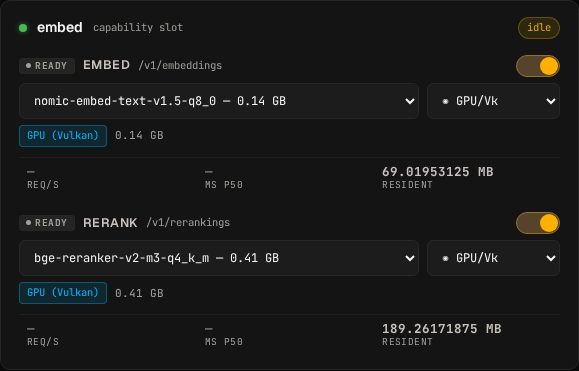
embed | Embeddings (/v1/embeddings) and rerank (/v1/rerankings) | llama.cpp (Vulkan) |
stt | Speech-to-text (/v1/audio/transcriptions) | Moonshine |
tts | Text-to-speech (/v1/audio/speech) | Kokoro |
img | Image generation (/v1/images/generations) | ComfyUI (ROCm) |
Why these five
Section titled “Why these five”They map directly to the modalities OpenAI exposes through /v1/*.
Any client written against the OpenAI SDK can hit hal0 unmodified and
reach chat, embeddings, transcription, speech, and image generation.
Rerank piggybacks on the embed slot because it uses the same backend
process.
Capability cards
Section titled “Capability cards”The dashboard groups these slots into capability cards so an
operator picks “embed” or “voice” without thinking about systemd
templates. The bridge is fixed in
src/hal0/capabilities/orchestrator.py:
embed→embed+rerank(auto-managed as theembed-rerankslot)voice→stt+ttsimg→img
On first enable of the rerank child, the capability orchestrator
synthesises an embed-rerank slot TOML, picks a free port in the
slot range (avoiding 8081 which primary owns — the deployed
default is 8086), and sets defaults.extra_args = "--reranking" so
llama-server exposes /v1/rerankings instead of the chat surface.
You don’t have to author it. The reranker default is
bge-reranker-v2-m3-q4_k_m.
The NPU backend card rolls up every NPU-capable model across the chat and embed slots in one disclosure, and is only advertised when AMD XDNA hardware is present and the FLM toolbox image is locally available.
Addressing
Section titled “Addressing”All five slots bind to 127.0.0.1 on a port in the slot range
(8081–8099). Only the API (:8080) and OpenWebUI (:3001) bind
public interfaces, which makes the whole thing trivial to put behind
a Traefik or Caddy vhost on your homelab gateway. Clients should
always talk to the API, never to a slot directly; the API does
authentication, single-flight, and structured-error wrapping.
You address a slot by its name in the OpenAI model field:
curl http://localhost:8080/v1/chat/completions \ -H "Content-Type: application/json" \ -d '{ "model": "primary", "messages": [{"role": "user", "content": "Hello!"}] }'The dispatcher resolves "primary" to whichever model is currently
loaded in the primary slot. See
Slot as model for the full convention.
Swapping the default model
Section titled “Swapping the default model”Every slot has a default model picked at install time by the hardware probe. You can swap it at any time:
hal0 slot swap primary --model qwen3-30b-a3b-instruct-2507-q4_k_mThe slot transitions through unloading → warming → ready without
dropping the API socket. In-flight requests on other slots keep
flowing.
The [model] default entry in primary.toml is the install-time
seed only — it is not consulted at runtime. Swap writes an env
override; the TOML stays stale by design. Don’t try to change the
live model by editing the TOML.
User-defined slots
Section titled “User-defined slots”Beyond the five built-ins, you can add custom slots. For example a
second chat model held hot in primary-fast, or an npu slot for
the FLM provider on AMD XDNA hardware. See
Custom slots.