What is a slot?
A slot is one inference workload running under hal0. Each slot owns
exactly one model, one backend process, one port on 127.0.0.1, and
one entry in the lifecycle state machine. Routing happens at the API
edge: clients send OpenAI-shaped requests, the dispatcher picks the
slot that owns the model, and the slot answers.
Concretely, each slot is a real systemd unit (e.g.
hal0-slot@primary.service, an instance of the hal0-slot@.service
template) running inside your LXC. systemctl status hal0-slot@primary
works the way you expect it to. The slot shares the LXC’s unified
memory pool with any other Proxmox tenants on the same node.
Why slots exist
Section titled “Why slots exist”Running an LLM in your homelab isn’t really an inference problem;
llama.cpp and friends already solve that. The hard part is everything
around it:
- Knowing when a model is actually ready for inference, separate from systemd reporting the unit is up.
- Handling cold-boot grace so the first request doesn’t time out while VRAM/GTT fills.
- Surviving an
hal0-apirestart without dropping the model. - Coalescing a thundering herd of identical prefetches into one upstream call.
- Reporting structured errors when a model can’t load, with enough detail that the dashboard can show why.
Slots are the abstraction that owns all of that. The API process is stateless; the slot owns the model.
Anatomy of a slot
Section titled “Anatomy of a slot”Each slot has:
- A name (
primary,embed,stt,tts,img, or a user-defined name). - A model assignment (a registry ref like
qwen2.5-0.5b-instruct-q4_k_m). - A provider (
llama.cpp,flm,moonshine,kokoro,comfyui) that knows how to build the env, start the process, and run a health probe. - A systemd unit, an instance of the
hal0-slot@.servicetemplate (e.g.hal0-slot@primary.service). - A port in the range
8081–8099, bound to127.0.0.1only. - A state file at
/var/lib/hal0/slots/<name>/state.json, updated atomically on every transition and streamed to clients over SSE.
Lifecycle states
Section titled “Lifecycle states”A slot moves through a fixed state machine:
offline → pulling → warming → ready → serving ↔ idle → unloadingoffline— defined but not running.pulling— fetching weights into the registry; emits byte-level SSE progress.warming— process started, health probe not yet green.ready— health probe is green, no in-flight requests.serving— handling at least one request.idle—ready, but the idle-timeout has tripped; eligible for unload if memory pressure rises.unloading— stopping the process, releasing GTT/VRAM, then back tooffline.
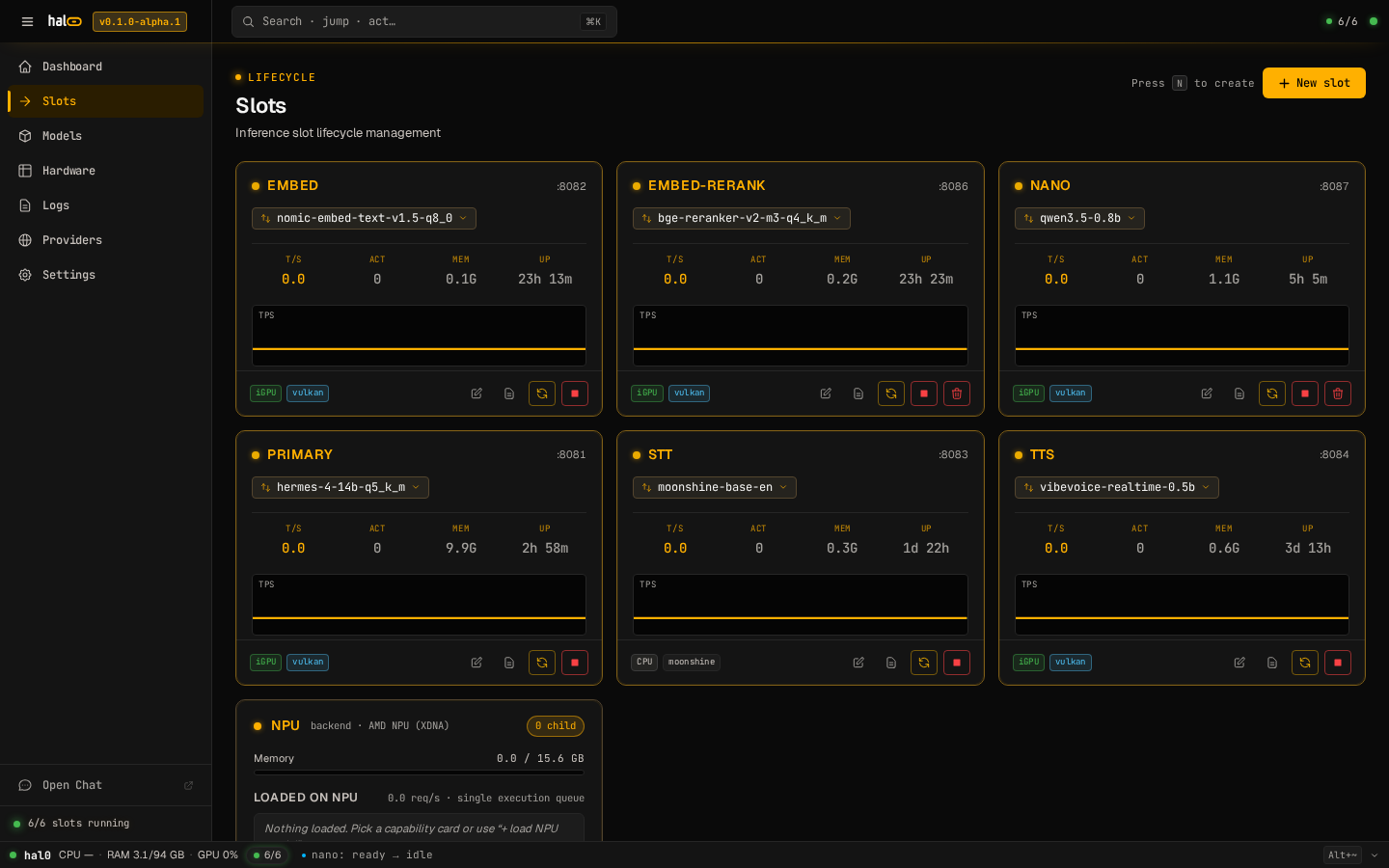
The dashboard’s /slots view renders the live state for every slot,
plus the per-slot T/S, ACT, MEM, and UP metrics.
How dispatch works
Section titled “How dispatch works”Clients hit http://127.0.0.1:8080/v1/*. The dispatcher reads the
model field, looks up which slot owns it, then proxies the request
to that slot’s local port.
- Single-flight prefetch. If N concurrent requests trigger the same cold load, the slot fires one upstream call and fans the response out to all N waiters.
- Adaptive cold-boot. Health probes back off intelligently while
the model is
warming, so the API doesn’t 503 a request that’s about to succeed. - Decision logging. Every routing choice is recorded with the registry refs considered, the slot picked, and the reason. The dashboard’s Logs view tails this stream over SSE.
What a slot is not
Section titled “What a slot is not”- Not a container manager. Slots use plain systemd template units, not Docker Compose or Kubernetes. Containerised backends (toolbox images for FLM, ROCm, ComfyUI, etc.) are an implementation detail of each provider.
- Not a model cache. Weights live under
/mnt/ai-models/localwith the index at/var/lib/hal0/registry/registry.toml(see the model registry); slots only reference registry entries. - Not multi-tenant inside hal0. Slot names are global to the install. There’s no per-user partitioning in the v0.1 alpha line; agent / multi-tenant work is on the v0.2 roadmap. Multi-tenancy between hal0 and other Proxmox guests on the same node is handled by the unified memory pool, which the dashboard surfaces.
- Built-in slots — the five always-present slots.
- Slot lifecycle — the state machine in detail.
- Recommended loadouts — pick models for each slot.